11 · Managing Receivers
Managing Receivers
Read enrolled receiver status, assign camera numbers, adjust brightness and color, and act on a misbehaving unit.
Ready-made kit · master only
Before you start
- 09 · Switcher Integration and 10 · Wireless Channel Setup done
- At least one receiver enrolled and powered on
Reading status#
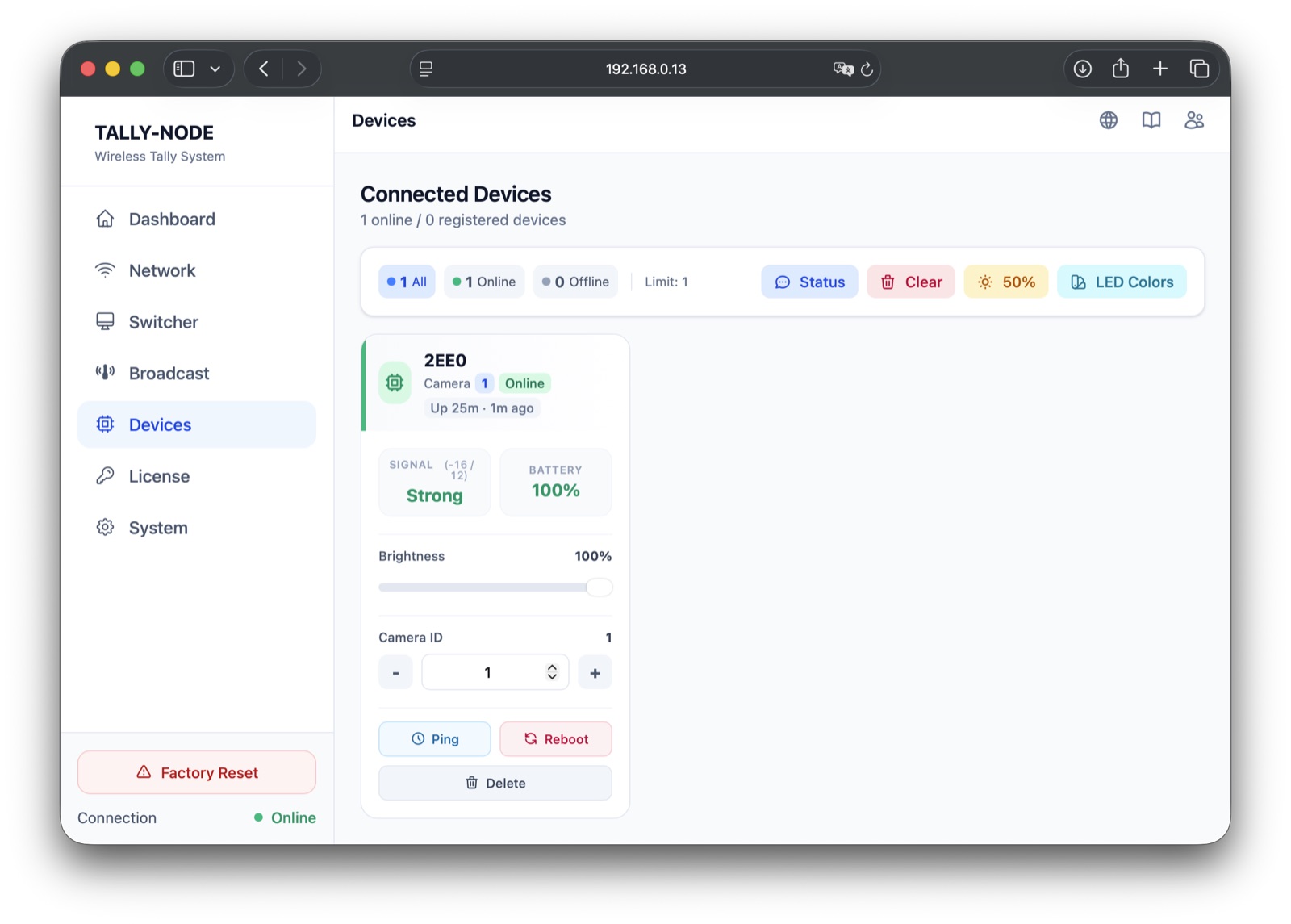
| Display | Meaning |
|---|---|
| ID (4 chars) | Unique receiver number |
| Camera N badge | Carried camera number (1-20) — the mapping source |
| Online / Offline | Offline after 90s without a report |
| Up · ago | Uptime + last contact (relative to device boot) |
| Signal (RSSI/SNR) | Link quality as reported by the receiver + Good/Fair/Weak |
| Battery | Percent (N/A = none or not reported) |
Assigning camera numbers#
- 1Change the number- / + or type 1-20 on the card → applies immediately (no save button)
- 2Wait (~30s)Command round-trip and status report → card shows the new number
- 3Verify lightingTake that camera to PGM on the switcher → the receiver lights red
To assign from the receiver's own button, see 12 · Receiver Operation.
Brightness and color#
| Control | Where | Range/value |
|---|---|---|
| Per-unit brightness | Card slider (online only) | 0-100% |
| Global brightness | Top modal | 25/50/75/100% presets + slider |
| OFF color preset | LED Color modal | Black OFF (default) / Blue OFF — applies to all on tap, no per-unit choice |
Presets only change the OFF color
PGM red and PVW green are fixed; presets change the OFF-state color only. Powered-off receivers miss presets — turn them on and tap again.
Acting on a problem receiver#
| Button | Confirm | Effect |
|---|---|---|
| Ping | No | Immediate status request → list refreshes on reply |
| Reboot | Yes | Restarts the receiver → briefly Offline, then back |
| Delete | Yes | Removes from the master list only (not a reset) |
| Status (top) | No | Status request to all receivers |
| Clear (top) | Yes | Deletes every enrollment and mapping |
Clear deletes everything
Cannot be restored — double-check before running it.
- All receivers Online
- Camera numbers assigned as intended
Offline or slow number updates: Troubleshooting · communication.
Next steps
Last modified —